Every meaningful action in ChartVoyant is written to a permanent, tamper-evident log: who did it, what they did, which record, when, and whether it succeeded. Opening a chart counts. Searching for a patient counts. Signing a note, booking an appointment, running an eligibility check, reading the audit log itself — all recorded.
New users sometimes hear that as surveillance. It's worth reframing, because it mostly protects you.
Why a permanent record is on your side
It answers accusations. "Nobody told me about that result" is answerable when the record shows who saw what, when.
It makes a mistake fixable instead of mysterious. When a wrong value appears in a chart, the trail shows where it came from — a fax, a kiosk answer, a typo at the desk — so it can be corrected at the source.
It's a legal requirement, and one your practice must be able to demonstrate. HIPAA expects covered entities to record and review access to health information. A practice without that record has a problem no amount of good intentions fixes.
It keeps the AI accountable. Every action an agent takes is recorded the same way as a human's, with the actor marked as an agent. There is no path by which something happens to a chart and nobody can tell what caused it.
Reading the log
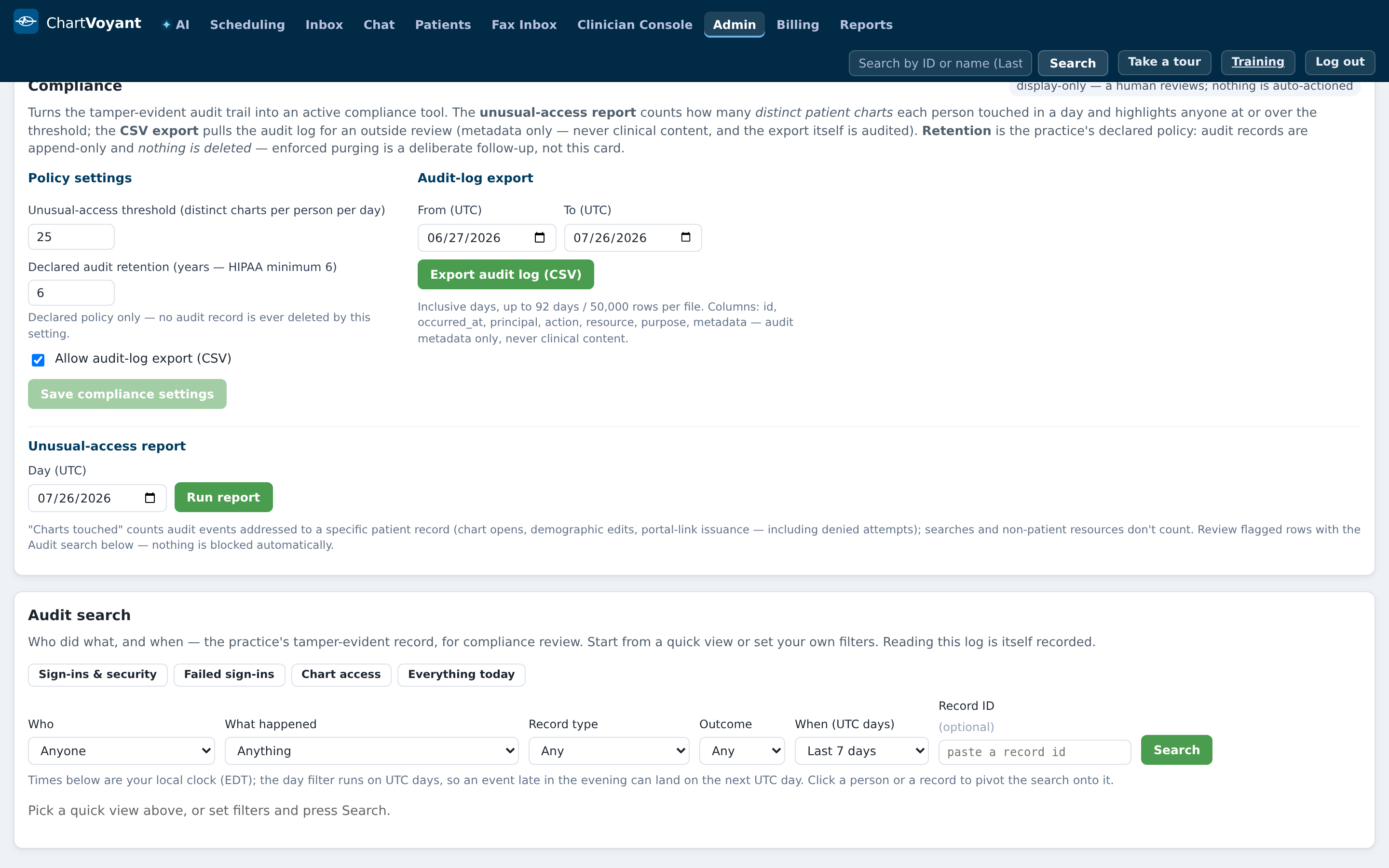
The full search lives in Admin → Audit search, so most staff won't open it day to day — but knowing what it holds tells you what your own footprint looks like.
The card explains itself: Who did what, and when — the practice's tamper-evident record, for compliance review.
Four quick views get you started without touching a filter:
- Sign-ins & security — account events over the last week
- Failed sign-ins — unsuccessful attempts over 30 days
- Chart access — who opened a patient chart today
- Everything today — the whole trail, unfiltered
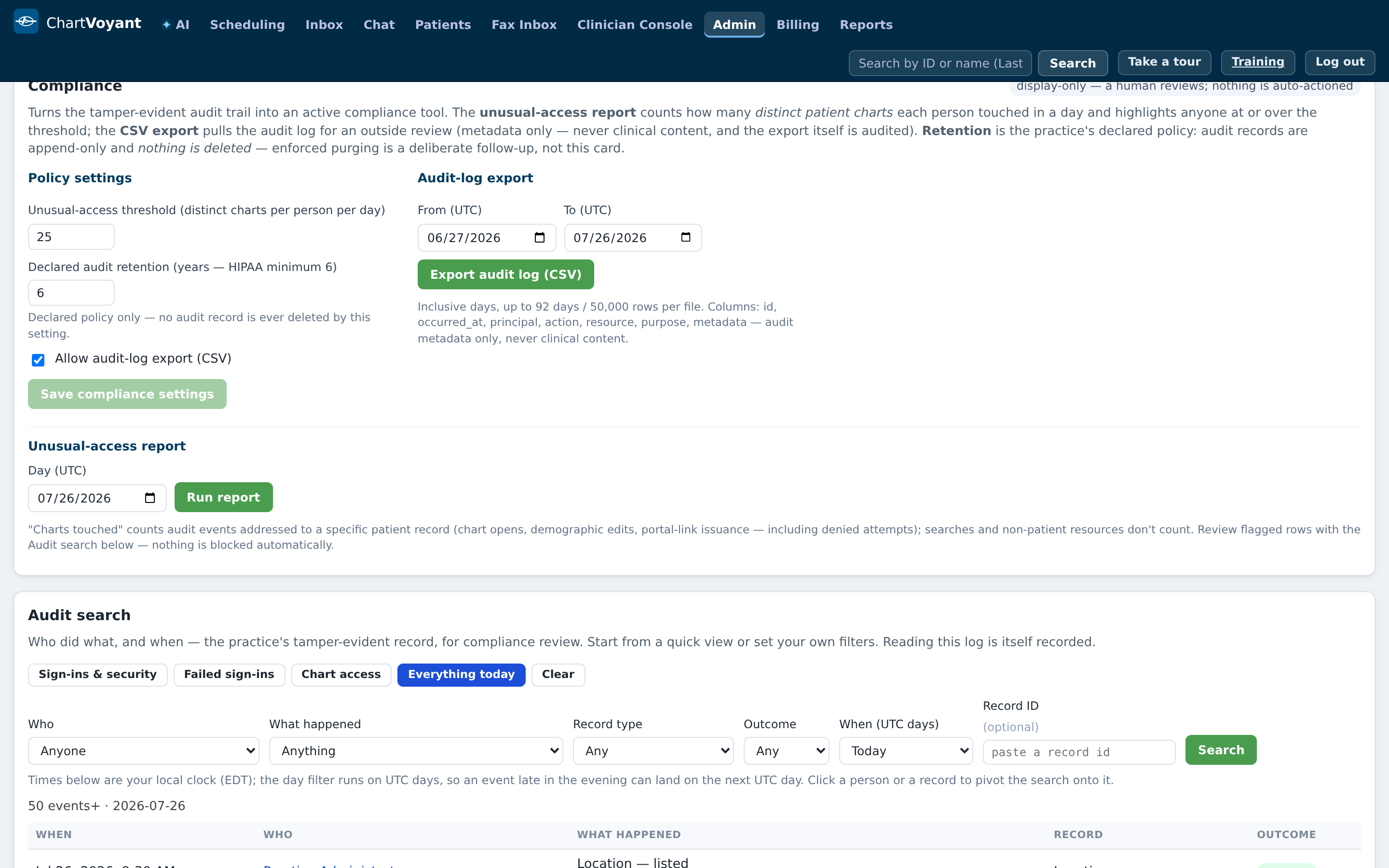
Results come back as five columns: When, Who, What happened, Record, Outcome.
What happened is in plain English — Opened patient chart, Signed a note, Booked an appointment, Checked insurance eligibility — with the raw system action underneath in monospace. Both are shown deliberately: the plain sentence is for people, and the raw string is what a compliance reviewer needs.
Click a person to see everything they did. Click a record to see everything that happened to it.
The per-record trail
You don't need the Admin console to see a single record's history. A fax in the Fax Inbox has View audit trail; an AI draft in the Clinician Console has View audit trail for this AI draft. Both show four columns — When, Action, Actor, Outcome — under a badge reading Tamper-evident audit chain: VALID ✓.
That badge is the whole point of the word "tamper-evident". The entries are chained together, so altering or deleting one breaks the chain and the badge turns to Audit chain: INVALID ✗. History can't be quietly rewritten.
Audit log versus Action Notes
They look similar and serve opposite purposes.
| Audit log | Action Notes | |
|---|---|---|
| Written by | The system, automatically | You, deliberately |
| For | Compliance, investigation, evidence | The next colleague to pick this up |
| Contains | Actor, action, record, time, outcome | Whatever you type |
| Can be edited | No | It's an append-only log; you can pin an entry |
If you want a colleague to know something, write an Action Note. Don't assume they'll go read the audit trail — that's not what it's for.
What your administrator can also do
Export the audit log to CSV for a date range, if the practice has enabled export. The export is itself logged.
Run the unusual-access report — flagging anyone who opened more than a set number of distinct charts in a day. It's a display-only report: a human reviews it and nothing is auto-actioned. The threshold is set by your practice.
Declare a retention period, with a HIPAA minimum of six years. Worth being precise about what that setting does: it declares policy. No audit record is deleted by it.
What usually goes wrong
Looking up someone you know. Curiosity about a neighbour, a colleague, or a celebrity patient is the most common cause of an access violation in healthcare, and Chart access shows exactly who opened which chart today. Open charts you have a reason to open.
Sharing a login. The log names the account, so a shared login attributes your colleague's actions to you — and yours to them.
Assuming a delete removes the history. It doesn't. The record of the change survives the change.
**Expecting the audit log to explain why.** It records what happened, not the reasoning. If a decision needs explaining, write it in the chart or in an Action Note at the time.