The clinician side of ChartVoyant is a staged visit. You move forward through four steps, and the software does its work in the background of each one rather than asking you to go and find it.
Getting into a visit
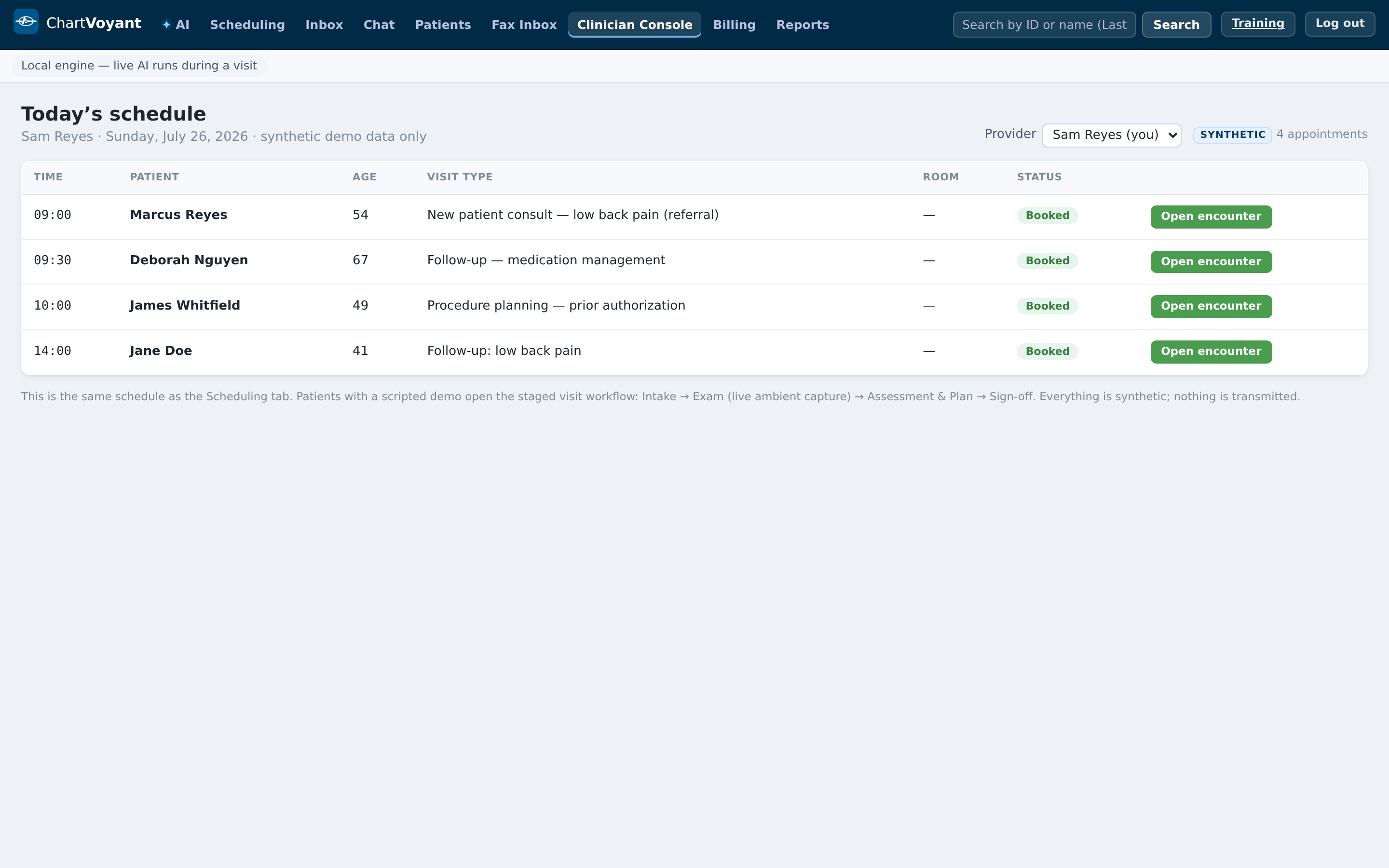
Clinician Console opens on Today's schedule — the same appointments as the Scheduling tab, laid out for you rather than for the desk.
Pick a provider from the dropdown (All providers by default; your own name gets (you) after it). The table is Time, Patient, Age, Visit type, Provider, Room, Status.
Press Open encounter on the row — or just click the row.
You can also start from the Scheduling tab: once a visit is underway its row grows an Encounter button.
The four stages
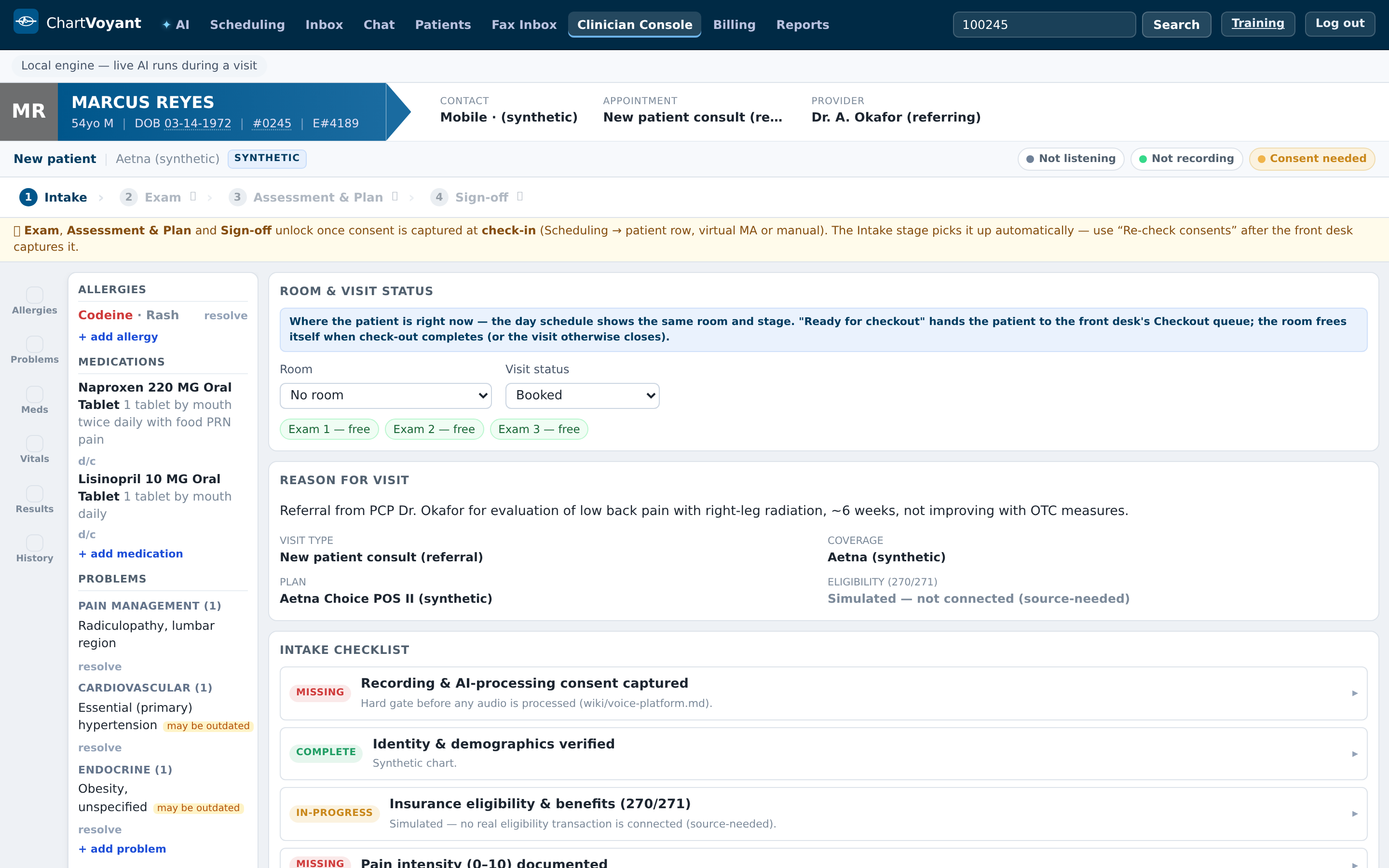
Across the top: 1 Intake › 2 Exam › 3 Assessment & Plan › 4 Sign-off.
A completed step shows ✓ instead of its number. A locked one shows 🔒.

- Intake — what the patient already told us, the checklist, and anything you need to document before the exam
- Exam — live ambient capture; the conversation becomes the transcript the rest of the visit is built from
- Assessment & Plan — the differential, draft orders, and the coding preview
- Sign-off — the note, the codes you attest to, and the five confirmations
The consent gate
Everything after Intake is locked until recording & AI-processing consent is on file. The locked step's tooltip says so: Locked — capture intake consent first (Intake stage).
The strip that never leaves
Under the patient banner sits a status line you should learn to read at a glance. On the left, New patient or Established patient, the payer, and a SYNTHETIC tag in training and demo practices. On the right, three chips:
| Chip | What it means |
|---|---|
| Listening / Not listening | Whether live capture is running right now |
| Not recording | Raw audio/video is never recorded or stored |
| Consent on file / Consent needed | Whether the gate above is satisfied |
The engine badge
Above the encounter there is a line telling you what is actually driving the assistance. It says one of five things:
- AI assist: thinking…
- Live AI assist: [model name] — a real model is running
- Local engine — set ANTHROPIC_API_KEY on the backend for live AI
- Backend assist unavailable — using local engine
- Local engine — live AI runs during a visit
Worth a glance at the start of a clinic. If it says local engine, the suggestions you get are deterministic fallbacks rather than a model reading the conversation — still usable, but not what the product is at its best.
What usually goes wrong
Waiting for a consent button that isn't there. There isn't one, by design — the stage re-reads consent by itself every few seconds. If it hasn't unlocked, the front desk hasn't captured it yet.
Starting the exam before the patient is roomed. The Room & visit status card in Intake is what the front desk's checkout queue reads. Setting it as you go keeps the day honest.
Treating the worklist as separate from the schedule. It is the same data. If a visit isn't there, it isn't booked.