The exam stage listens. That is nearly all it does — and the interesting parts are what it does not do.
Starting
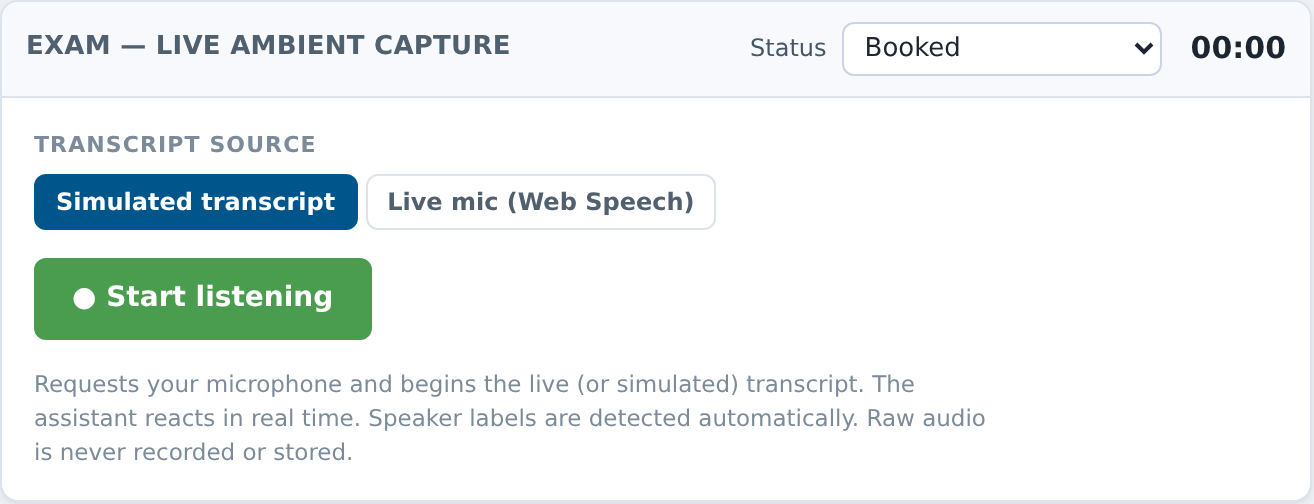
The panel is headed Exam — live ambient capture. Before you start there are two controls:
Transcript source — Simulated transcript or Live mic (Web Speech).
● Start listening — disabled until consent is on file.
The hint underneath is the whole feature in four sentences: Requests your microphone and begins the live (or simulated) transcript. The assistant reacts in real time. Speaker labels are detected automatically. Raw audio is never recorded or stored.
Once running you get a LIVE pill, a running clock with a red dot, and the status Listening (live) or Listening (simulation).
Controls: Pause listening (which becomes Resume listening, and the pill turns PAUSED with Paused — not listening), and End exam → Assessment & Plan.
Speaker shows auto-detected — there is no manual toggle, and the tooltip says why: Speaker is detected automatically from the conversation — no manual toggle.
At the bottom, a manual line entry: Type a line… (speaker auto-detected; drives the assistant live) with Add line. Useful when something is said off-mic and you want the assistant to have it.
What is kept, and what isn't
The little level meter next to the controls says exactly one of three things — mic live, mic ready, or no mic signal — and it is a listening indicator only.
Reading the transcript
⧉ Transcript opens the drawer, subtitled live visit capture · read-only. Each segment carries: a speaker (Clinician, Patient, or Unknown speaker), a speaker-confidence chip, a time, a confidence percentage, and a tag of simulated or live ASR. Two more tags appear when the system is unsure of itself: low confidence and unsure speaker.
Those two tags are worth taking seriously. Everything downstream — the differential, the draft orders, the note the AI offers to write — is built on this text.
When the microphone won't play
The panel surfaces the real reason rather than a generic failure:
| What you see | What to do |
|---|---|
| Permission was denied. Allow the microphone in the browser site settings, then retry. | Fix it in the browser's site settings, not in the EMR |
| No microphone was found on this device. | Wrong device, or the headset isn't connected |
| The microphone is in use by another application. | Close the other app — a video call usually |
| Media could not be started. You can continue in simulation mode. | Carry on; document by hand |
| Web Speech unavailable — use manual input or simulation. | This browser can't do live speech recognition |
None of these stop the visit. They stop the transcript, which means you write the note yourself — which is what you would have been doing anyway.
Ending the exam
End exam → Assessment & Plan stops capture and moves you on. The transcript stays; the assistant keeps everything it drafted while listening.
What usually goes wrong
Talking to the screen instead of the patient. The point of ambient capture is that you stop typing. Look at the person.
Assuming silence is captured. If the meter says no mic signal, nothing is arriving. Check before a long consultation, not after.
Trusting a low-confidence line. Fix it in the note while you remember what was actually said.
Forgetting you left it paused. PAUSED is a visible pill and Paused — not listening is the status text, but it is easy to pause for a phone call and never resume.