Everything in this lesson is audited, and most of it signs somebody out. Read the confirmations.
Creating a user
Users → New user. The card explains its own stakes: Login accounts for this practice. Disabling an account blocks sign-in and revokes its sessions; resetting 2FA clears the authenticator enrollment so the user re-enrolls at next login. Every action is audited.
Fields: Username (lowercase letters, digits, and
._-only — e.g. mlopez), Display name, Role, Password (min 8). Then Create user.
There are exactly three roles: Clinician, Non-clinician, Administrator.
The table shows Username, Display name, Role, Provider, Status, 2FA, Token v. and actions.
Providers versus users
Make provider / Remove provider decides whether an account appears on the schedule. The tooltips are precise: Make this account a bookable provider — they appear on the schedule and Remove this account's provider status — drops them from the schedule for new bookings.
Removing asks first: Remove provider status from {username}? They'll no longer appear on the schedule for new bookings. Existing appointments are unaffected.
A provider's clinical identity — NPI, DEA, licence, specialties, signature block — lives in a separate Providers card. Login account here; credentials there.
The capability grid
Roles & permissions is a grid: Capability down the side, then Administrator (locked), Clinician, Front desk / non-clinician across.
Four capabilities, each with a plain description:
Capability What it covers View reports & analytics Reports tab: ops dashboard, quality, financial rollups View billing & RCM Billing summaries, claims, RCM work queues (read) Work billing Eligibility checks, claim submission, RCM work items Prescribe Create and sign prescriptions Save permissions applies immediately: Permissions saved — billing, reports, and prescribing enforce them immediately.
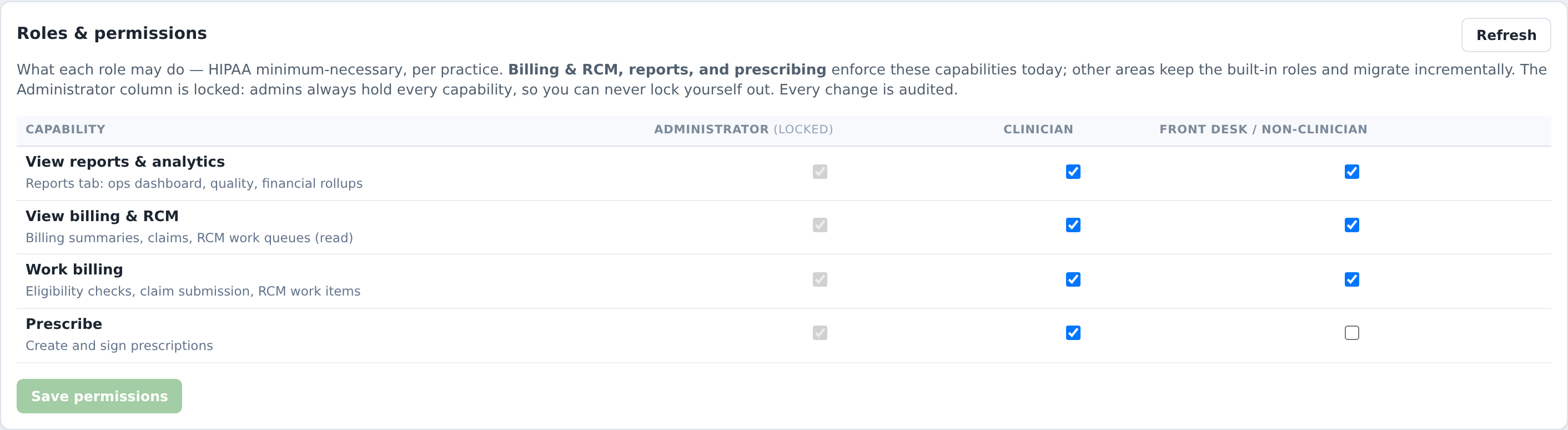
There is a known rough edge worth telling staff about: with View billing removed, a patient's Billing tab currently sits on Loading billing… rather than saying you lack permission. If somebody reports a page that never loads, check their role first.
The reset actions
Reset 2FA asks: Reset 2FA for {username}? Their authenticator enrollment is cleared and sessions are revoked. Use it when someone loses their phone — they re-enrol at next sign-in.
Revoke sessions fires with no confirmation and signs the person out everywhere. Harmless but abrupt; they can sign back in immediately.
Disable asks: Disable {username}? They will be signed out and unable to log in. This is the leaver action.
What usually goes wrong
Editing a capability to deal with one person. Capabilities are per role. For one person, disable the account.
Expecting a password reset button. There isn't one.
Revoking sessions and thinking it locked someone out. It didn't.
Forgetting the provider/user split. A new clinician needs an account and provider status and an entry in Providers before they can be booked and bill correctly.